> ## Documentation Index
> Fetch the complete documentation index at: https://wb-21fd5541-sdk-testing-latest.mintlify.site/llms.txt
> Use this file to discover all available pages before exploring further.

> W&B Sweeps を使用したハイパーパラメーター探索とモデルの最適化

# Sweeps の概要

export const TryProductLink = ({url}) => <a href={url} target="_blank" rel="noopener noreferrer" className="github-source-link">
    <svg width="20" height="20" viewBox="0 0 24 24" fill="none" stroke="currentColor" strokeWidth="2" strokeLinecap="round" strokeLinejoin="round" xmlns="http://www.w3.org/2000/svg">
      <line x1="4" y1="21" x2="4" y2="14"></line>
      <line x1="4" y1="10" x2="4" y2="3"></line>
      <line x1="12" y1="21" x2="12" y2="12"></line>
      <line x1="12" y1="8" x2="12" y2="3"></line>
      <line x1="20" y1="21" x2="20" y2="16"></line>
      <line x1="20" y1="12" x2="20" y2="3"></line>
      <circle cx="4" cy="12" r="2"></circle>
      <circle cx="12" cy="10" r="2"></circle>
      <circle cx="20" cy="14" r="2"></circle>
    </svg>
    W&amp;Bで試す
  </a>;

export const ColabLink = ({url}) => <a href={url} target="_blank" rel="noopener noreferrer" className="colab-link">
    <svg width="20" height="20" viewBox="0 0 24 24" fill="currentColor" xmlns="http://www.w3.org/2000/svg">
      <path d="M14.25.18l.9.2.73.26.59.3.45.32.34.34.25.34.16.33.1.3.04.26.02.2-.01.13V8.5l-.05.63-.13.55-.21.46-.26.38-.3.31-.33.25-.35.19-.35.14-.33.1-.3.07-.26.04-.21.02H8.77l-.69.05-.59.14-.5.22-.41.27-.33.32-.27.35-.2.36-.15.37-.1.35-.07.32-.04.27-.02.21v3.06H3.17l-.21-.03-.28-.07-.32-.12-.35-.18-.36-.26-.36-.36-.35-.46-.32-.59-.28-.73-.21-.88-.14-1.05-.05-1.23.06-1.22.16-1.04.24-.87.32-.71.36-.57.4-.44.42-.33.42-.24.4-.16.36-.1.32-.05.24-.01h.16l.06.01h8.16v-.83H6.18l-.01-2.75-.02-.37.05-.34.11-.31.17-.28.25-.26.31-.23.38-.2.44-.18.51-.15.58-.12.64-.1.71-.06.77-.04.84-.02 1.27.05zm-6.3 1.98l-.23.33-.08.41.08.41.23.34.33.22.41.09.41-.09.33-.22.23-.34.08-.41-.08-.41-.23-.33-.33-.22-.41-.09-.41.09zm13.09 3.95l.28.06.32.12.35.18.36.27.36.35.35.47.32.59.28.73.21.88.14 1.04.05 1.23-.06 1.23-.16 1.04-.24.86-.32.71-.36.57-.4.45-.42.33-.42.24-.4.16-.36.09-.32.05-.24.02-.16-.01h-8.22v.82h5.84l.01 2.76.02.36-.05.34-.11.31-.17.29-.25.25-.31.24-.38.2-.44.17-.51.15-.58.13-.64.09-.71.07-.77.04-.84.01-1.27-.04-1.07-.14-.9-.2-.73-.25-.59-.3-.45-.33-.34-.34-.25-.34-.16-.33-.1-.3-.04-.25-.02-.2.01-.13v-5.34l.05-.64.13-.54.21-.46.26-.38.3-.32.33-.24.35-.2.35-.14.33-.1.3-.06.26-.04.21-.02.13-.01h5.84l.69-.05.59-.14.5-.21.41-.28.33-.32.27-.35.2-.36.15-.36.1-.35.07-.32.04-.28.02-.21V6.07h2.09l.14.01.21.03zm-6.47 14.25l-.23.33-.08.41.08.41.23.33.33.23.41.08.41-.08.33-.23.23-.33.08-.41-.08-.41-.23-.33-.33-.23-.41-.08-.41.08z" />
    </svg>
    Colabで試す
  </a>;

<CardGroup cols={4}>
  <ColabLink url="https://colab.research.google.com/github/wandb/examples/blob/master/colabs/pytorch/Organizing_Hyperparameter_Sweeps_in_PyTorch_with_W%26B.ipynb" />

  <TryProductLink url="https://wandb.ai/stacey/deep-drive/workspace?workspace=user-lavanyashukla" />
</CardGroup>

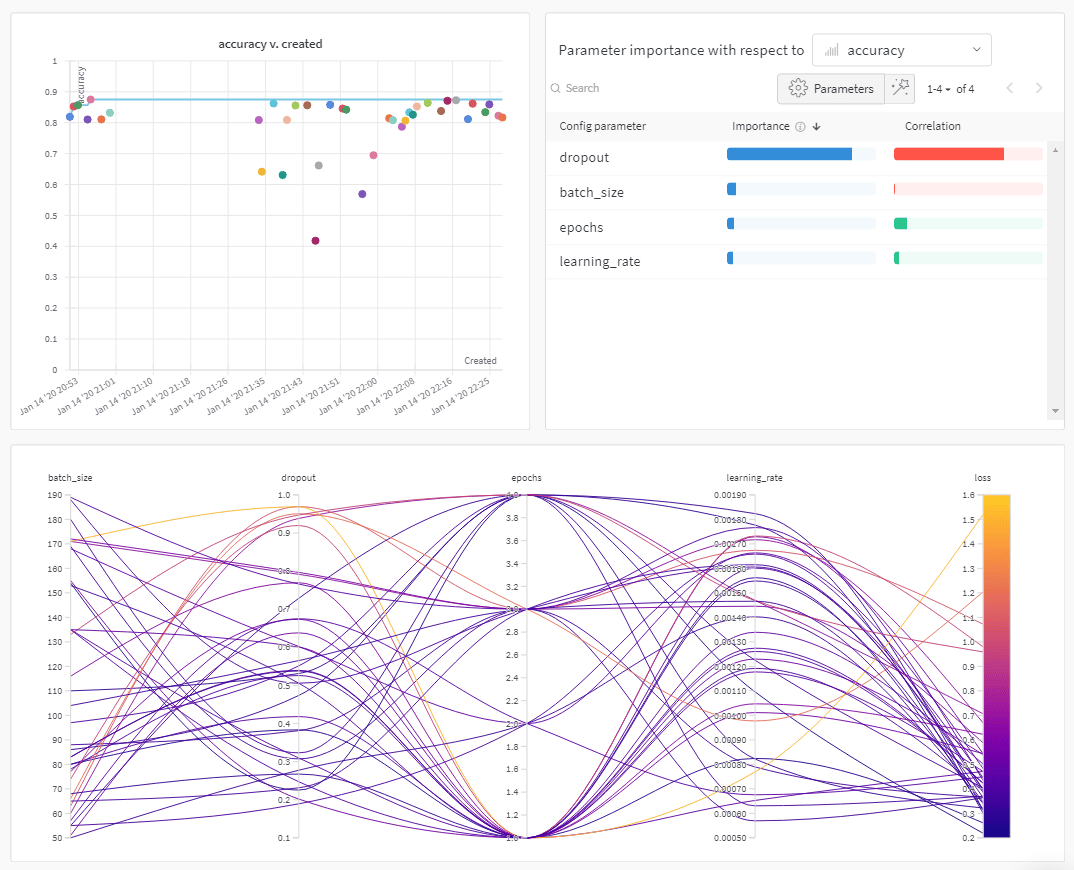
W\&B Sweeps を使用すると、ハイパーパラメーター探索を自動化し、充実したインタラクティブな実験管理を可視化できます。Bayesian、グリッドサーチ、ランダムなど、一般的な探索 method から選択して、ハイパーパラメーター空間を探索できます。1 台以上のマシンにまたがって sweep をスケールし、並列実行できます。
<Frame>
  <img src="https://mintcdn.com/wb-21fd5541-sdk-testing-latest/H06KgVKW2CsyczDM/images/sweeps/intro_what_it_is.png?fit=max&auto=format&n=H06KgVKW2CsyczDM&q=85&s=ef176f3119f35ad89351b0b762ed59ea" alt="ハイパーパラメーター調整のインサイト" width="1074" height="870" data-path="images/sweeps/intro_what_it_is.png" />
</Frame>

<div id="how-it-works">
  ## 仕組み
</div>

2 つの [W\&B CLI](/ja/models/ref/cli/) コマンドを使って sweep を作成します。

1. sweep を初期化します。

```bash theme={null}
  wandb sweep --project <project-name> <path-to-config file>
```

2. sweep エージェントを起動します。

```bash theme={null}
  wandb agent <sweep-ID>
```

<Note>
  前述のコードスニペットと、このページからリンクされている Colab では、W\&B CLI を使用して sweep を初期化し、作成する方法を示しています。Python SDK を使用して sweep を設定、初期化、実行する方法については、[Sweeps ウォークスルー](/ja/models/sweeps/walkthrough/)を参照してください。
</Note>

<div id="how-to-get-started">
  ## はじめに
</div>

ユースケースに応じて、W\&B Sweeps を使い始めるために、以下のリソースを参照してください。

* sweep 設定の定義、sweep の初期化、sweep の開始に使用する W\&B Python SDK コマンドを step ごとに説明した [sweeps ウォークスルー](/ja/models/sweeps/walkthrough/) をお読みください。
* この章では、次の方法を学べます。
  * [コードに W\&B を追加する](/ja/models/sweeps/add-w-and-b-to-your-code/)
  * [sweep 設定を定義する](/ja/models/sweeps/define-sweep-configuration/)
  * [sweeps を初期化する](/ja/models/sweeps/initialize-sweeps/)
  * [sweep agents を開始する](/ja/models/sweeps/start-sweep-agents/)
  * [sweep の結果を可視化する](/ja/models/sweeps/visualize-sweep-results/)
* W\&B Sweeps を使用したハイパーパラメーター最適化を紹介する、厳選された [Sweep Experiments の一覧](/ja/models/sweeps/useful-resources/) を参照してください。結果は W\&B Reports に保存されます。

step ごとの video については、こちらを参照してください。[Tune Hyperparameters Easily with W\&B Sweeps](https://www.youtube.com/watch?v=9zrmUIlScdY\&ab_channel=Weights%26Biases)。

<div id="notebook-examples">
  ### ノートブックの例
</div>

以下のノートブック例では、さまざまなフレームワークやユースケースで、W\&B Sweeps を使ったハイパーパラメーター最適化の方法を紹介しています。

* [Sweeps を使用したハイパーパラメーター最適化](https://colab.research.google.com/github/wandb/examples/blob/master/colabs/tensorflow/Hyperparameter_Optimization_in_TensorFlow_using_W\&B_Sweeps.ipynb)
* [XGBoost で W\&B Sweeps を使用する](https://colab.research.google.com/github/wandb/examples/blob/master/colabs/boosting/Using_W\&B_Sweeps_with_XGBoost.ipynb)
