> ## Documentation Index
> Fetch the complete documentation index at: https://wb-21fd5541-sdk-testing-latest.mintlify.site/llms.txt
> Use this file to discover all available pages before exploring further.
> W&B Artifacts Overview, 작동 방식, 그리고 사용 시작 방법.
# Artifacts Overview
export const TryProductLink = ({url}) =>
W&B에서 사용해 보기
;
export const ColabLink = ({url}) =>
Colab에서 사용해 보기
;
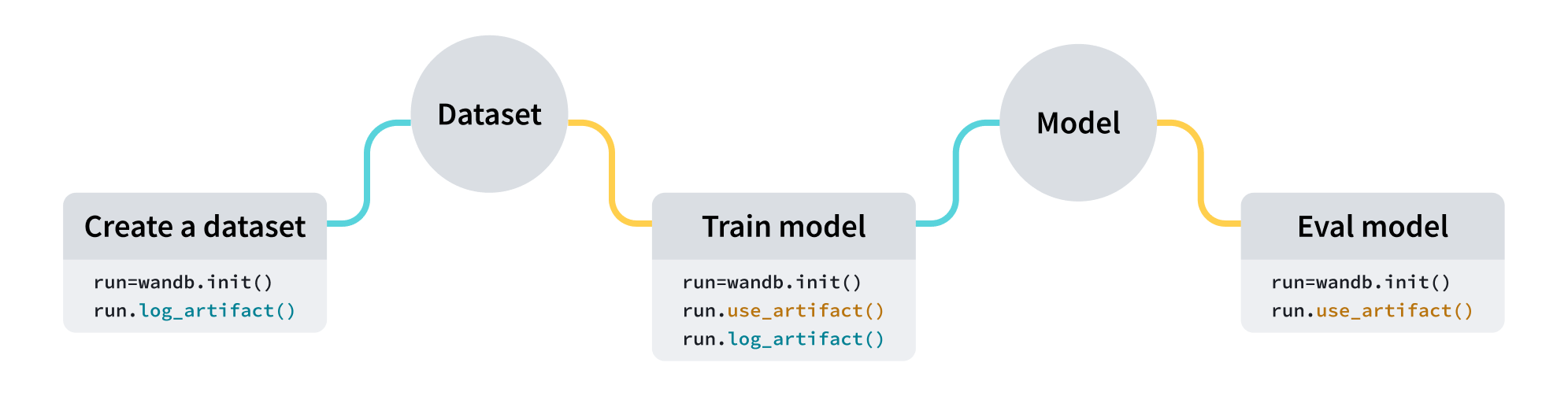
W\&B Artifacts를 사용해 [W\&B Runs](/ko/models/runs)의 입력 및 출력으로 사용되는 데이터를 추적하고 버전 관리하세요. 예를 들어, 모델 트레이닝 run은 입력으로 데이터셋을 받아 출력으로 트레이닝된 모델을 생성할 수 있습니다. 하이퍼파라미터, 메타데이터, 메트릭을 run에 기록할 수 있으며, artifact를 사용해 모델 트레이닝에 사용된 데이터셋을 입력으로 기록, 추적, 버전 관리하고, 결과로 생성된 모델 checkpoint를 출력으로 기록할 수 있습니다.
## 사용 사례
전체 ML 워크플로 전반에서 아티팩트를 [runs](/ko/models/runs)의 입력과 출력으로 사용할 수 있습니다. 처리 작업의 입력으로 데이터셋, 모델, 또는 다른 아티팩트를 사용할 수도 있습니다.
| 사용 사례 | 입력 | 출력 |
| -------- | ------------------- | ------------------------------- |
| 모델 트레이닝 | 데이터셋(트레이닝 및 검증 데이터) | 트레이닝된 모델 |
| 데이터셋 전처리 | 데이터셋(원시 데이터) | 데이터셋(전처리된 데이터) |
| 모델 평가 | 모델 + 데이터셋(테스트 데이터) | [W\&B Table](/ko/models/tables) |
| 모델 최적화 | 모델 | 최적화된 모델 |
다음 코드 스니펫은 순서대로 실행해야 합니다.
## artifact 만들기
네 줄의 코드로 artifact를 만들 수 있습니다:
1. [W\&B run](/ko/models/runs)을 생성하세요.
2. [`wandb.Artifact`](/ko/models/ref/python/experiments/artifact)를 사용해 artifact 객체를 생성하세요.
3. `wandb.Artifact.add_file()`로 모델 파일이나 데이터셋 같은 파일을 하나 이상 artifact 객체에 추가하세요.
4. `wandb.Run.log_artifact()`로 artifact를 W\&B에 기록하세요.
예를 들어, 다음 코드 스니펫은 `dataset.h5`라는 파일을 `example_artifact`라는 artifact에 기록하는 방법을 보여줍니다:
```python theme={null}
import wandb
with wandb.init(project="artifacts-example", job_type="add-dataset") as run:
artifact = wandb.Artifact(name="example_artifact", type="dataset")
artifact.add_file(local_path="./dataset.h5", name="training_dataset")
run.log_artifact(artifact)
```
* artifact의 `유형`은 W\&B 플랫폼에서 artifact가 어떻게 표시되는지에 영향을 줍니다. `유형`을 지정하지 않으면 기본값은 `unspecified`입니다.
* 드롭다운의 각 라벨은 서로 다른 `type` 매개변수 값을 나타냅니다. 위 코드 스니펫에서 artifact의 `유형`은 `dataset`입니다.
Amazon S3 버킷과 같은 외부 객체 저장소에 저장된 파일 또는 디렉터리에 레퍼런스를 추가하는 방법은 [외부 파일 추적](/ko/models/artifacts/track-external-files) 페이지를 참조하세요.
## artifact 다운로드
[`wandb.Run.use_artifact()`](/ko/models/ref/python/experiments/run#use_artifact) 메서드를 사용해 run의 입력으로 표시할 artifact를 지정합니다.
이전 코드 스니펫에 이어, 다음 코드 예제는 앞서 생성한 `example_artifact`라는 artifact를 사용하는 방법을 보여줍니다:
```python theme={null}
with wandb.init(project="artifacts-example", job_type="add-dataset") as run:
artifact = run.use_artifact("training_dataset:latest") # "my_data" artifact를 사용하는 run 객체를 반환합니다
```
이는 artifact 객체를 반환합니다.
다음으로, 반환된 객체를 사용해 artifact의 모든 내용을 다운로드하세요:
```python theme={null}
datadir = artifact.download() # 전체 `my_data` artifact를 기본 디렉토리에 다운로드합니다.
```
특정 디렉터리에 artifact를 다운로드하려면 `root` [매개변수](/ko/models/ref/python/experiments/artifact)에 맞춤형 경로를 전달하면 됩니다. artifact를 다운로드하는 다른 방법과 추가 매개변수는 [artifact 다운로드 및 사용](/ko/models/artifacts/download-and-use-an-artifact) 가이드를 참조하세요.
## 다음 단계
* 아티팩트를 [버전 관리](/ko/models/artifacts/create-a-new-artifact-version)하고 [업데이트](/ko/models/artifacts/update-an-artifact)하는 방법을 알아보세요.
* [automations](/ko/models/automations)를 사용해 아티팩트가 변경될 때 다운스트림 워크플로를 트리거하거나 Slack 채널로 알림을 받는 방법을 알아보세요.
* 학습된 모델을 보관하는 공간인 [레지스트리](/ko/models/registry)에 대해 알아보세요.
* [Python SDK](/ko/models/ref/python/experiments/artifact) 및 [CLI](/ko/models/ref/cli/wandb-artifact) 레퍼런스 가이드를 살펴보세요.
 | 사용 사례 | 입력 | 출력 |
| -------- | ------------------- | ------------------------------- |
| 모델 트레이닝 | 데이터셋(트레이닝 및 검증 데이터) | 트레이닝된 모델 |
| 데이터셋 전처리 | 데이터셋(원시 데이터) | 데이터셋(전처리된 데이터) |
| 모델 평가 | 모델 + 데이터셋(테스트 데이터) | [W\&B Table](/ko/models/tables) |
| 모델 최적화 | 모델 | 최적화된 모델 |
| 사용 사례 | 입력 | 출력 |
| -------- | ------------------- | ------------------------------- |
| 모델 트레이닝 | 데이터셋(트레이닝 및 검증 데이터) | 트레이닝된 모델 |
| 데이터셋 전처리 | 데이터셋(원시 데이터) | 데이터셋(전처리된 데이터) |
| 모델 평가 | 모델 + 데이터셋(테스트 데이터) | [W\&B Table](/ko/models/tables) |
| 모델 최적화 | 모델 | 최적화된 모델 |