> ## Documentation Index
> Fetch the complete documentation index at: https://wb-21fd5541-sdk-testing-latest.mintlify.site/llms.txt
> Use this file to discover all available pages before exploring further.
# Customize Ops
> Learn how to color your Ops for better visibility, how to modify what's logged, and how to control the sampling rate
A Weave Op is a versioned function that automatically logs all Calls. This guide is for developers who use Weave to instrument their code, and shows you how to create Ops, customize how they appear in the Weave UI, control what data Weave logs, and manage sampling and deletion.
To create an Op, decorate a Python function with `weave.op()`.
```python lines theme={null}
import weave
@weave.op()
def track_me(v):
return v + 5
weave.init('intro-example')
track_me(15)
```
Calling an Op creates a new Op version if the code changed from the last call, and logs the function's inputs and outputs.
Functions that you decorate with `@weave.op()` behave normally (without code versioning and tracking) if you don't call `weave.init('your-project-name')` before calling them.
You can [serve](/weave/guides/tools/serve) or [deploy](/weave/guides/tools/deploy) Ops using the Weave toolbelt.
To create an Op, wrap a TypeScript function with `weave.op`.
```typescript twoslash lines theme={null}
// @noErrors
import * as weave from 'weave'
function trackMe(v: number) {
return v + 5
}
const trackMeOp = weave.op(trackMe)
trackMeOp(15)
// You can also do this inline, which may be more convenient
const trackMeInline = weave.op((v: number) => v + 5)
trackMeInline(15)
```
## Customize display names
A custom display name makes it easier to identify an Op in the Weave UI, especially when the function name is generic or auto-generated.
To customize the Op's display name, set the `name` parameter in the `@weave.op` decorator:
```python lines theme={null}
@weave.op(name="custom_name")
def func():
...
```
```text theme={null}
This feature is not available in TypeScript yet.
```
## Apply kinds and colors
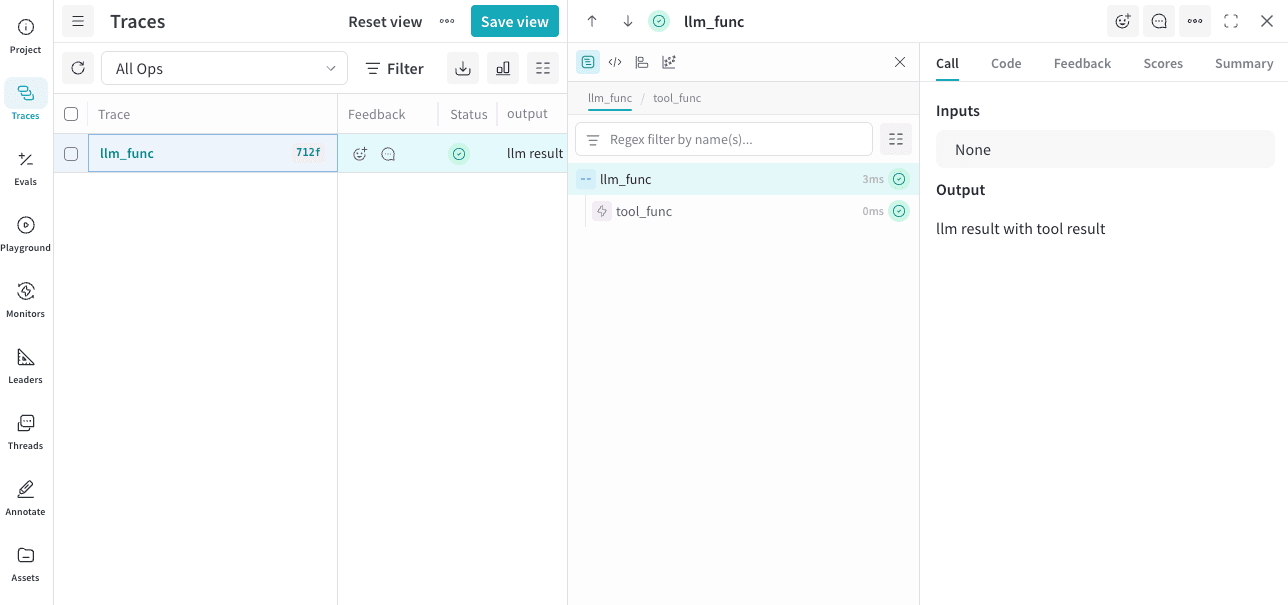
To better organize your Ops in the Weave UI, apply custom kinds and colors by adding the `kind` and `color` arguments to the `@weave.op` decorators in your code. For example, the following code applies an `LLM` `kind` and a `blue` `color` to the parent function, and a `tool` `kind` and a `red` `color` to a nested function:
```python lines theme={null}
import weave
weave.init("[YOUR-TEAM-NAME]/[YOUR-PROJECT-NAME]")
@weave.op(kind="LLM", color="blue")
def llm_func():
@weave.op(kind="tool", color="red")
def tool_func():
return "tool result"
tool_result = tool_func()
return f"llm result with {tool_result}"
llm_func()
```
```text theme={null}
This feature is not available in TypeScript yet.
```
This applies the colors and kinds to your Ops in the Weave UI, like this:
 The available `kind` values are:
* `agent`
* `llm`
* `tool`
* `search`
The available `color` values are:
* `red`
* `orange`
* `yellow`
* `green`
* `blue`
* `purple`
## Customize logged inputs and outputs
To change the data that Weave logs without modifying the original function (for example, to hide sensitive data), pass `postprocess_inputs` and `postprocess_output` to the Op decorator.
`postprocess_inputs` takes a dict where the keys are the argument names and the values are the argument values, and returns a dict with the transformed inputs.
`postprocess_output` takes any value that the function would normally return and returns the transformed output.
```python lines theme={null}
from dataclasses import dataclass
from typing import Any
import weave
@dataclass
class CustomObject:
x: int
secret_password: str
def postprocess_inputs(inputs: dict[str, Any]) -> dict[str, Any]:
return {k:v for k,v in inputs.items() if k != "hide_me"}
def postprocess_output(output: CustomObject) -> CustomObject:
return CustomObject(x=output.x, secret_password="REDACTED")
@weave.op(
postprocess_inputs=postprocess_inputs,
postprocess_output=postprocess_output,
)
def func(a: int, hide_me: str) -> CustomObject:
return CustomObject(x=a, secret_password=hide_me)
weave.init('hide-data-example')
func(a=1, hide_me="password123")
```
```text theme={null}
This feature is not available in TypeScript yet.
```
## Control sampling rate
To control how frequently Weave traces an Op's calls, set the `tracing_sample_rate` parameter in the `@weave.op` decorator. Use this for high-frequency Ops where you only need to trace a subset of calls.
Collect all traces during agent development to help you shape and understand its behavior. In production, configure trace sampling to lower costs while maintaining observability into your agent's behavior.
Weave applies sampling rates only to outer-most Ops. If a nested Op has a sample rate but a parent Op calls it first, Weave ignores the sampling rate of the nested Op.
```python lines theme={null}
@weave.op(tracing_sample_rate=0.1) # Only trace ~10% of calls
def high_frequency_op(x: int) -> int:
return x + 1
@weave.op(tracing_sample_rate=1.0) # Always trace (default)
def always_traced_op(x: int) -> int:
return x + 1
```
When Weave doesn't sample an Op's call:
* The function executes normally.
* Weave receives no trace data.
* Weave doesn't trace child Ops for that call.
The sampling rate must be between 0.0 and 1.0 inclusive.
```text theme={null}
This feature is not available in TypeScript yet.
```
## Control Call link output
By default, Weave prints a link to each Call as it logs the Call. To suppress the printing of Call links during logging, set the `WEAVE_PRINT_CALL_LINK` environment variable to `false`. Use this to reduce output verbosity and clutter in your logs.
```bash lines theme={null}
export WEAVE_PRINT_CALL_LINK=false
```
## Delete an Op
Deleting an Op version removes it from your project. Use this to clean up obsolete or unwanted versions.
To delete a version of an Op, call `.delete()` on the Op ref.
```python lines theme={null}
weave.init('intro-example')
my_op_ref = weave.ref('track_me:v1')
my_op_ref.delete()
```
Accessing a deleted Op returns an error.
```text theme={null}
This feature is not available in TypeScript yet.
```
The available `kind` values are:
* `agent`
* `llm`
* `tool`
* `search`
The available `color` values are:
* `red`
* `orange`
* `yellow`
* `green`
* `blue`
* `purple`
## Customize logged inputs and outputs
To change the data that Weave logs without modifying the original function (for example, to hide sensitive data), pass `postprocess_inputs` and `postprocess_output` to the Op decorator.
`postprocess_inputs` takes a dict where the keys are the argument names and the values are the argument values, and returns a dict with the transformed inputs.
`postprocess_output` takes any value that the function would normally return and returns the transformed output.
```python lines theme={null}
from dataclasses import dataclass
from typing import Any
import weave
@dataclass
class CustomObject:
x: int
secret_password: str
def postprocess_inputs(inputs: dict[str, Any]) -> dict[str, Any]:
return {k:v for k,v in inputs.items() if k != "hide_me"}
def postprocess_output(output: CustomObject) -> CustomObject:
return CustomObject(x=output.x, secret_password="REDACTED")
@weave.op(
postprocess_inputs=postprocess_inputs,
postprocess_output=postprocess_output,
)
def func(a: int, hide_me: str) -> CustomObject:
return CustomObject(x=a, secret_password=hide_me)
weave.init('hide-data-example')
func(a=1, hide_me="password123")
```
```text theme={null}
This feature is not available in TypeScript yet.
```
## Control sampling rate
To control how frequently Weave traces an Op's calls, set the `tracing_sample_rate` parameter in the `@weave.op` decorator. Use this for high-frequency Ops where you only need to trace a subset of calls.
Collect all traces during agent development to help you shape and understand its behavior. In production, configure trace sampling to lower costs while maintaining observability into your agent's behavior.
Weave applies sampling rates only to outer-most Ops. If a nested Op has a sample rate but a parent Op calls it first, Weave ignores the sampling rate of the nested Op.
```python lines theme={null}
@weave.op(tracing_sample_rate=0.1) # Only trace ~10% of calls
def high_frequency_op(x: int) -> int:
return x + 1
@weave.op(tracing_sample_rate=1.0) # Always trace (default)
def always_traced_op(x: int) -> int:
return x + 1
```
When Weave doesn't sample an Op's call:
* The function executes normally.
* Weave receives no trace data.
* Weave doesn't trace child Ops for that call.
The sampling rate must be between 0.0 and 1.0 inclusive.
```text theme={null}
This feature is not available in TypeScript yet.
```
## Control Call link output
By default, Weave prints a link to each Call as it logs the Call. To suppress the printing of Call links during logging, set the `WEAVE_PRINT_CALL_LINK` environment variable to `false`. Use this to reduce output verbosity and clutter in your logs.
```bash lines theme={null}
export WEAVE_PRINT_CALL_LINK=false
```
## Delete an Op
Deleting an Op version removes it from your project. Use this to clean up obsolete or unwanted versions.
To delete a version of an Op, call `.delete()` on the Op ref.
```python lines theme={null}
weave.init('intro-example')
my_op_ref = weave.ref('track_me:v1')
my_op_ref.delete()
```
Accessing a deleted Op returns an error.
```text theme={null}
This feature is not available in TypeScript yet.
```